
What you can build
- A single PDF from multiple source PDFs
- A PDF from a folder of images (scans, screenshots, diagrams)
- A mixed PDF with some pages from a PDF + some image pages
- Any of the above with reordered pages, blank separator pages, and text annotations
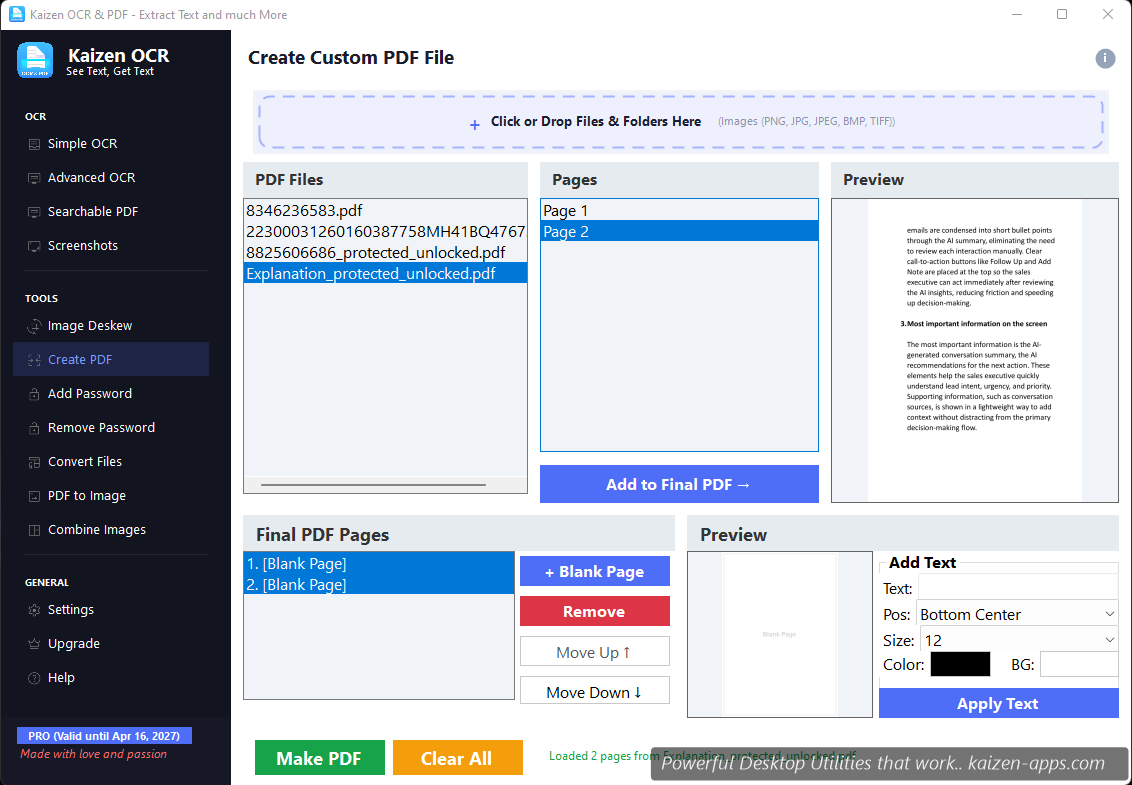
The three panes
- Source files (left) — drop in PDFs and images. Each expands to show its pages.
- Final pages (center) — drag pages from source into this list in whatever order you want. This is your output.
- Preview (right) — visual preview of the selected final-list page, with the annotation editor below.
Workflow
- Drop your source files into the left pane.
- Drag pages from source to the Final pages list. Reorder by dragging within the final list.
- Click Insert blank page to add a separator.
- Select any final-list page to add an annotation.
- Click Save PDF and pick an output location.
Annotations
For each page, you can add a text annotation with:
- Position — 9 anchor points (top/middle/bottom × left/center/right)
- Font — family, size, bold/italic
- Colour — text colour and optional background box
- Text — any single-line text (great for page numbers, labels, headers)
Common uses
- Scan batches into one PDF — scan several pages, drop them in, hit Save.
- Reorder a bad PDF — drag pages into the right order.
- Combine a cover letter with a CV — drop both, reorder, add a header annotation, save.
- Insert blank separator pages — useful when printing duplex.
Limits
Create PDF has a quota of 7 runs on the Free tier. A “run” = one Save PDF operation. There's no page-count limit per run.
Kaizen OCR & PDF
Extract text from any image or PDF, edit, convert and OCR — fast, accurate and fully offline on Windows.
Get Kaizen OCR & PDF →Free download