
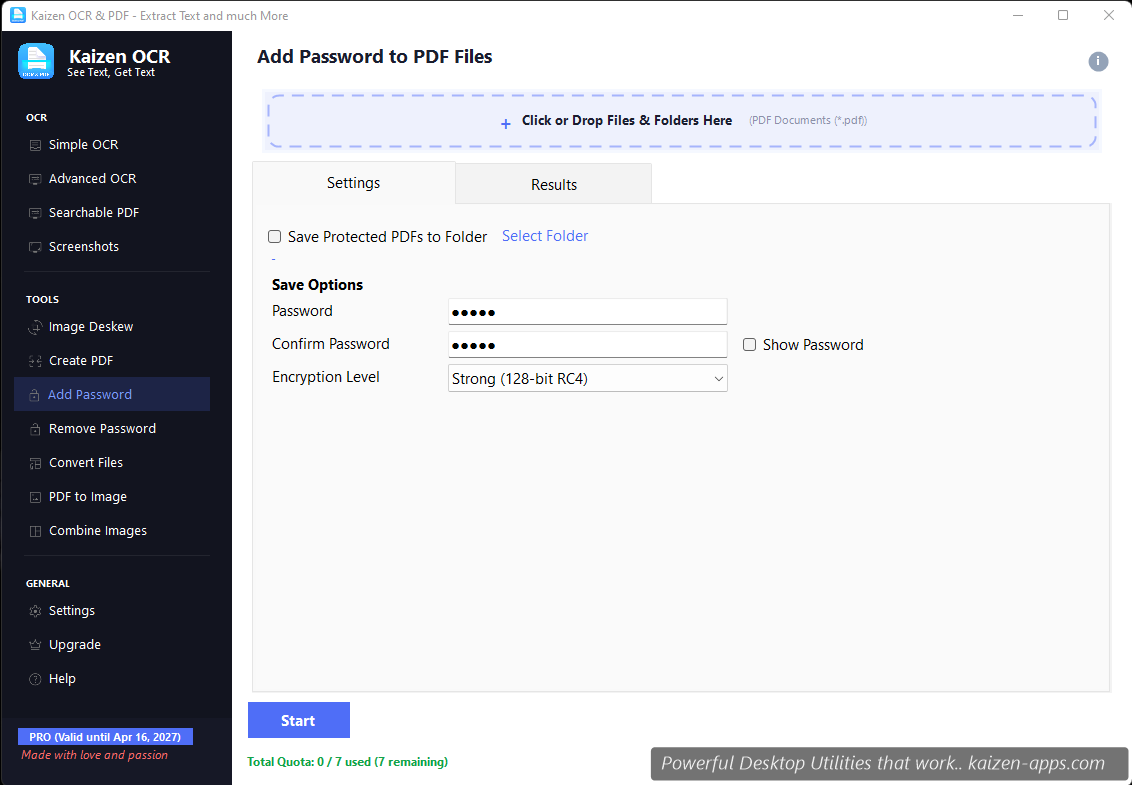
Workflow
- Drop the PDF you want to protect.
- Enter a password in both fields (they must match).
- Pick the output path.
- Click Encrypt. The original PDF is untouched; the output is a new, password-protected copy.
Encryption strength
Kaizen OCR uses AES-128 or AES-256 encryption (depending on the source PDF version). This is the standard used by modern PDF readers — Adobe, Preview (macOS), and all major browsers understand it.
Keep your password somewhere safe. If you lose it, there's no backdoor — we can't recover a password-protected PDF for you. Use a password manager.
Batch protection
You can drop multiple PDFs; Kaizen OCR applies the same password to all of them. Useful for bulk-protecting a folder of client documents.
What's actually protected
- Opening the PDF requires the password.
- Printing, copying, and editing can additionally be restricted (advanced options).
- The encryption is on the file itself — it works regardless of where the file travels (email, Dropbox, USB stick).
Free tier
7 runs on Free.
Kaizen OCR & PDF
Extract text from any image or PDF, edit, convert and OCR — fast, accurate and fully offline on Windows.
Get Kaizen OCR & PDF →Free download