Built with ❤ in India by StepForward Solutions
Get Speech Studio
Main Products
Speech Studio OCR & PDF Focus Timer
Download Blog Speech Studio Help Contact
Download Speech Studio
Kaizen Speech Studio · Windows 10/11

AI voices that
sound human.

603+ neural voices across 80+ languages. Paste text, pick a voice, hit generate — studio-quality audio in seconds. Transcribe audio, dub videos into any language, and download YouTube videos. All powered by your own Azure key.

9 hours free / month 250k char free input Bring your own Azure key Lifetime licenses
603+
Neural voices
80+
Languages
9h
Free / month
HD
Premium voices

Five pro-grade tools in one desktop app.

From narrating audiobooks to dubbing short films — Speech Studio handles your whole voice production pipeline.

Text-to-Speech

Paste. Pick a voice. Hit generate.

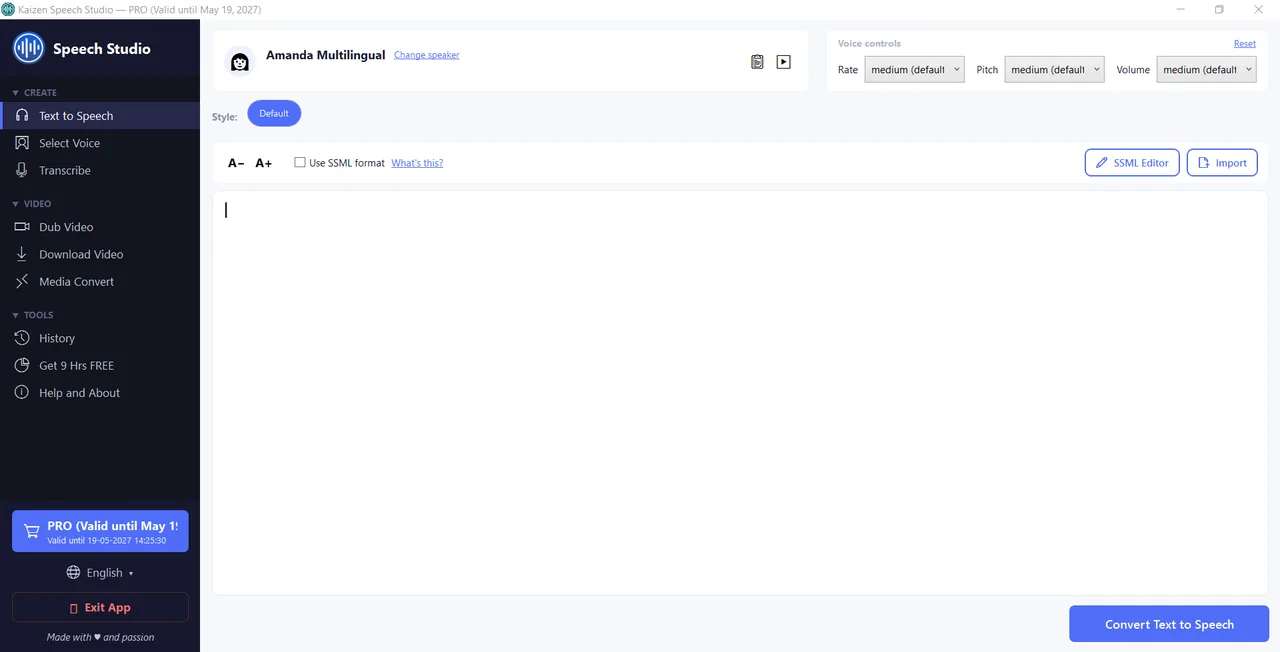
Speech Studio's core feature is the cleanest TTS workflow you'll use on desktop. Drop a block of text, pick a voice from 603+ Azure neural options (including premium HD variants), adjust rate / pitch / style, and export to MP3 or WAV.

  • 250,000 characters per input (Free), unlimited on Pro
  • 603+ voices including standard and premium HD quality
  • 80+ languages including Hindi, Chinese, Japanese, Arabic, and all major Latin-script languages
  • Per-voice style selection (cheerful, serious, customerservice, narration, etc.)
  • Prosody control: rate, pitch, volume with presets and custom values
  • Full SSML editor with visual inserts for voice / style / prosody / language overrides
  • Import from TXT, PDF, DOC, DOCX (Pro)
Text-to-Speech panel with voice selector, prosody controls, and SSML toggle
Voice picker

603+ voices. Filter, preview, pick.

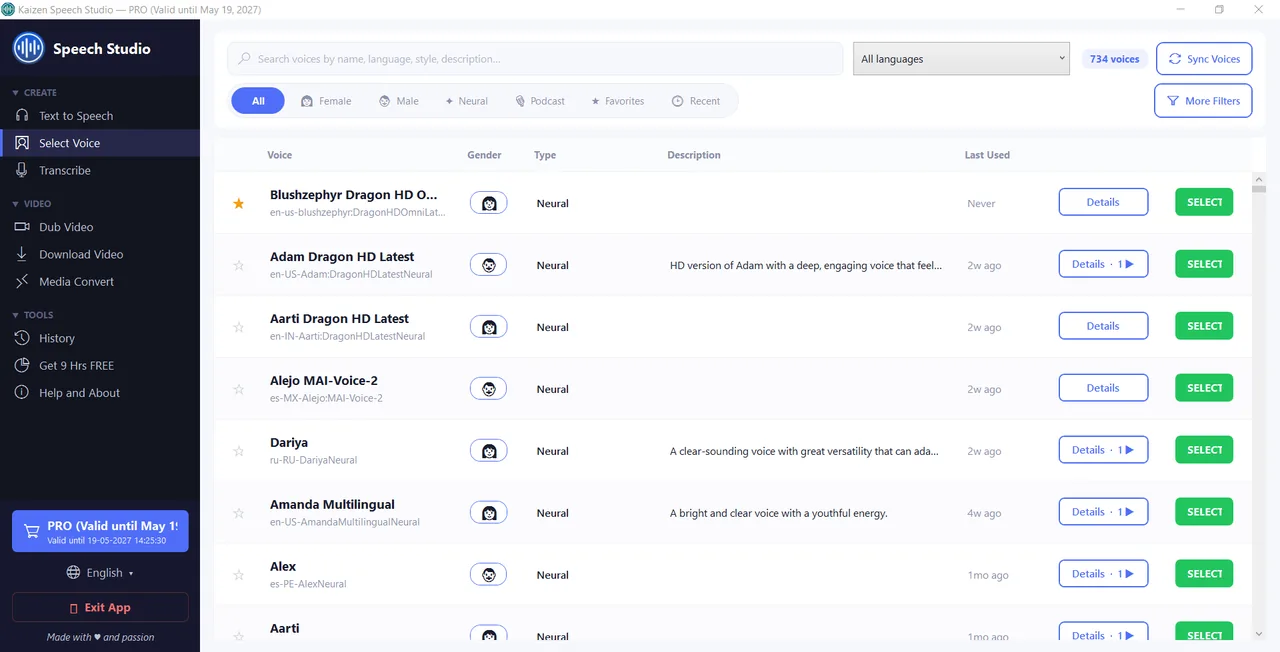
The voice grid shows every Azure voice with gender, type (Neural / HD / MultiTalker), description, sample count, and a play-preview button. Filter by gender, language, country, or speaker name. Advanced filters for voice characteristics (bright, calm, friendly, etc.).

  • Gender, language, country, personality filters
  • Per-voice style samples (hear how it sounds saying “cheerful” vs “serious”)
  • Premium HD variants — Azure's highest quality voices
  • MultiTalker (e.g. Ava & Andrew) for multi-speaker dialogue
  • Usage tracking — see which voices you use most
Voice picker grid with filters and play-sample buttons
Transcribe

Live mic or audio file, any language.

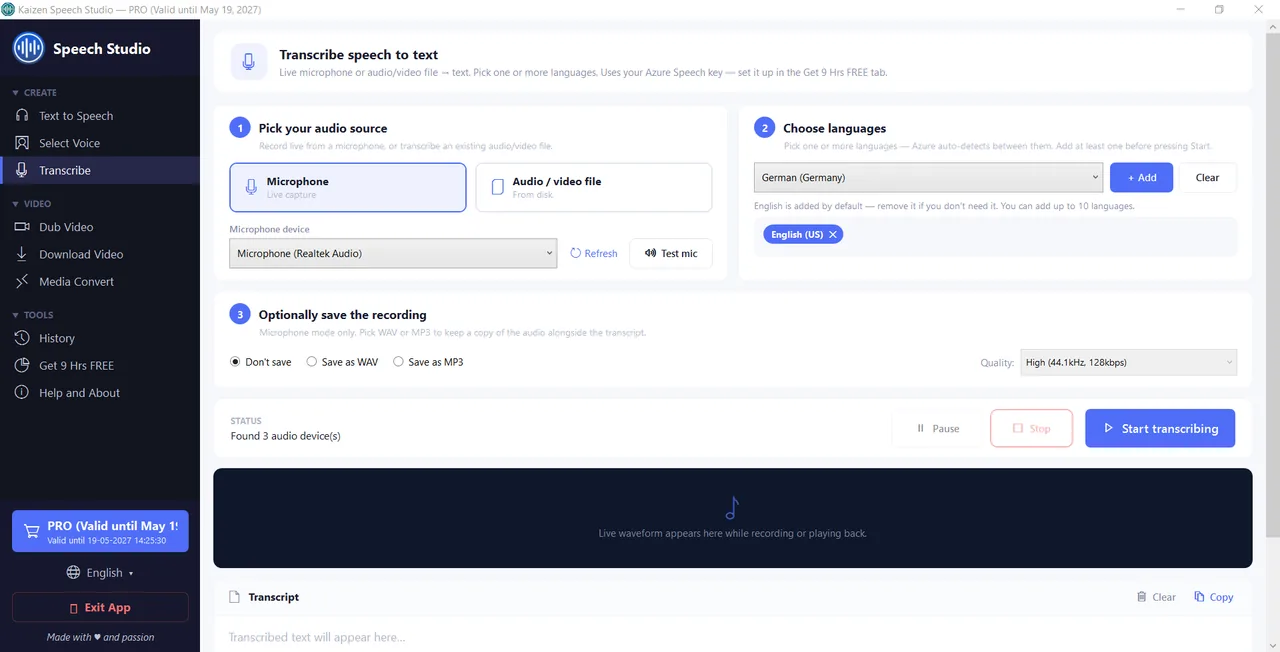
Two input modes: live microphone (start / stop / pause) or file upload. Supports WAV, MP3, OGG, FLAC. Azure auto-detects language in most cases, or pick one from the list. Record the live session as MP3 or WAV alongside the transcript.

  • Live mic transcription with real-time preview
  • File upload: WAV, MP3, OGG, FLAC
  • Quality presets: High (44.1kHz) and others
  • Record mic input to file while transcribing
  • Copy transcript to clipboard or export to text file
  • 5 hours / month on Pro (BYOK Azure)
Transcribe UI with live microphone mode and language selector
Dub Video · Pro

Turn one video into ten languages.

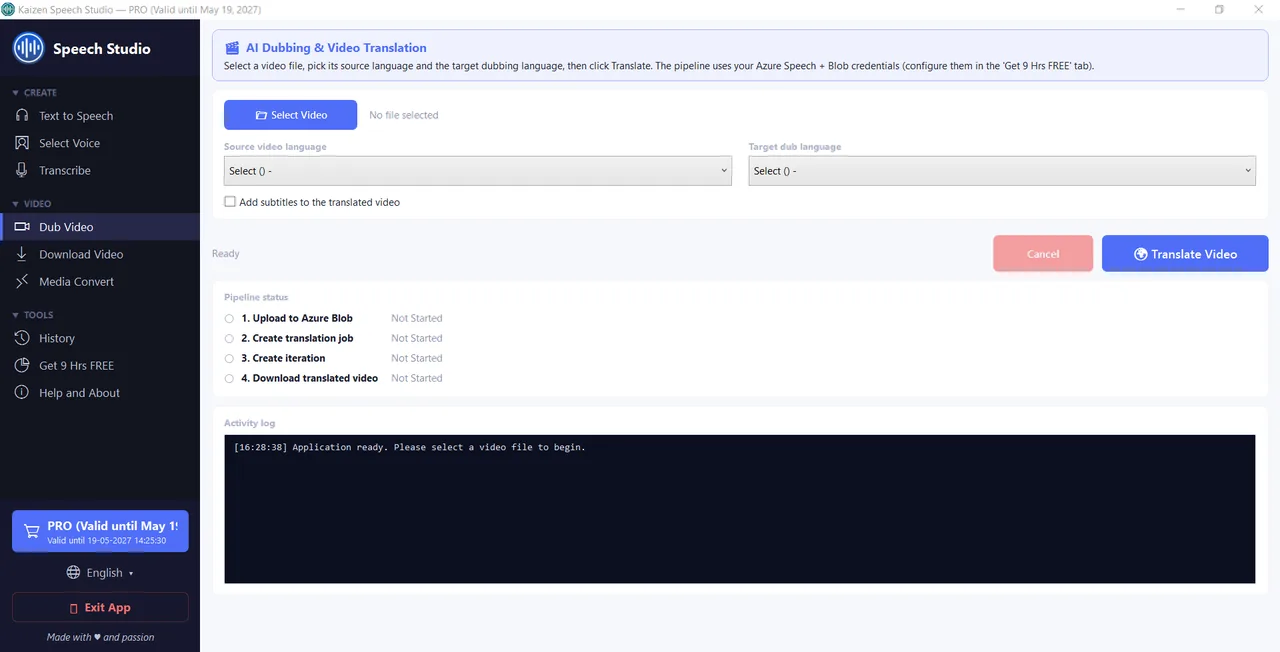
Pick source language, pick target language, hit Start Dubbing. Azure Video Translation handles transcription, translation, voice synthesis, and audio-video re-sync. The result is a new video where voices speak the target language — as if it were shot that way.

  • Multi-stage pipeline: Upload → Translate → Generate → Download (visible progress per stage)
  • Optional subtitle track in target language
  • Requires: Azure Speech Service + Azure Blob Storage (guided setup)
  • Preserves original video — output is a new file
  • Pro feature (needs Pro/Premium license + your Azure resources)
AI Dubbing with source / target language selection and progress tracker
Download Video

URL in. File out. Up to 1440p.

Paste a YouTube URL, pick video or audio-only, choose your quality (up to 1440p), hit Download. Useful for feeding videos into Dub Video, extracting audio for podcasting, or saving content for offline use.

  • YouTube + common video platforms
  • Video output: up to 1440p
  • Audio-only output: MP3 extraction
  • Free tier: 2 downloads (counter visible in UI). Unlimited on Pro.
Download Video UI with URL input, video/audio toggle, and quality selector
History & cost tracking

Every generation, logged.

Every TTS generation, transcription, dub, and improve-text call is logged with cost, voice, duration, and timestamp. Filter, search, re-run, or export. Keeps your Azure spend visible so there are no surprises.

  • Transaction log with activity type (Speech, Transcribe, Dub, Improve)
  • Cost in USD per row
  • Sort by cost, voice, language, timestamp
  • Re-run a past generation with one click
  • Clear search / filter / delete entries
History log with transactions, costs, and re-run option

Don’t take our word for it. Listen.

These are Microsoft Azure’s neural voices — the same ones used by enterprises worldwide. Click any voice to hear a sample.

🇺🇸

Ava HD

US English • Female

🇺🇸

Jenny

US English • Female

🇩🇪

Seraphina HD

German • Female

🇺🇸

Aria

US English • Female

🇬🇧

Sonia

UK English • Female

🇦🇺

Natasha

AU English • Female

🇮🇳

Aarav

Indian English • Male

🇦🇪

Fatima

Arabic (UAE) • Female

🇪🇸

Joana

Catalan • Female

🇨🇿

Vlasta

Czech • Female

🇩🇰

Christel

Danish • Female

🇧🇬

Kalina

Bulgarian • Female

🇮🇳

Tanishaa

Bengali • Female

🇿🇦

Adri

Afrikaans • Female

🇪🇹

Mekdes

Amharic • Female

🇪🇬

Salma

Arabic (Egypt) • Female

16 of 603+ voices shown. Download Speech Studio to browse all.

Hear what multi-voice scenarios sound like

These were generated using Kaizen Speech Studio with multiple voices and SSML. Click to listen.

🎬

Family drama

Multi-character scene with emotional voice styles

📞

Tech support call

Customer service voice style demonstration

🚀

Startup pitch

Professional narration with confident tone

🔬

Science fiction

Dramatic narration with atmospheric delivery

💬

Customer feedback

Natural-sounding dialogue with two speakers

👨‍🏫

Teacher & student

Educational dialogue with clear enunciation

How it compares

We’re not ElevenLabs. We don’t pretend to be. Here’s where we fit.

Kaizen Speech StudioElevenLabsPlayHTMurf AI
Voice qualityVery good (Azure Neural + HD)Best in classVery goodGood
Emotional rangeStyles (cheerful, serious, etc.) — good, not cinematicDeep emotion, cloningGoodModerate
Free tier9 hours / month10 min / month~5 min / month10 min / month
Monthly cost after free$0 (Azure free tier) or $49/yr for Pro$5–$22 / month + credits$31 / month$23 / month
Voices603+ (Microsoft Azure)~30 + cloning~900~200
Languages80+2980+20+
SSML control Full editorLimited
Video dubbing (Azure)
Transcription
Desktop app WindowsWeb onlyWeb onlyWeb only
Data privacyKeys stay local, your Azure accountCloud-processedCloud-processedCloud-processed
Commercial use Microsoft ToS
If you need the absolute best emotional voices for character acting, ElevenLabs is hard to beat. But if you’re a YouTuber, audiobook creator, documentary narrator, or educator who needs natural, professional-quality voices without a monthly subscription that stacks with per-credit charges — Microsoft’s Azure voices are genuinely excellent, and 9 hours every month is genuinely free. We just built the best desktop wrapper for them.

Verify the free tier yourself: Azure Free Services — microsoft.com

Bring your own Azure. Keep your keys local.

Speech Studio connects to your own Azure Speech Service (and optional Blob Storage for video dubbing). We never see your key — it stays on your machine and is never uploaded anywhere.

Azure Speech Service

Required for TTS, transcription, and dubbing. Free tier = 9 hours/month of TTS.

8-step guide

Azure Blob Storage

Only needed for Dub Video. Create a container, paste the connection string.

11-step guide

Free is 9 hrs. Pro is unlimited.

Yearly for ongoing use, Lifetime for one-and-done. Both unlock Azure-key persistence, PDF/DOC imports, video dubbing, and the full SSML editor.

Free

$0
forever
  • 9 hours TTS / month
  • 603+ Azure voices
  • 80+ languages
  • 250k characters / generation
  • 2 video downloads / month
  • PDF/DOC import, video dub, SSML
Download Free

Lifetime

$99
one-time · yours forever
  • Everything in Pro
  • No renewals, ever
  • Lifetime updates
  • Transferable between your devices
  • Priority support
Get Lifetime
3-day no-questions-asked refund · Secure payment via Paddle · Azure cost is separate, billed by Microsoft
Up to 50% off

Doing something good? We’d love to help.

If you’re a student, running a non-profit, working for a cause, or making a positive impact on people, the planet, or the climate in any way — we’d love to play our small part. Send us a short note about what you do, and we’ll offer you up to 50% off any Kaizen license. Because we also want to give back.

Students Non-profits Climate & cause work Positive impact
Email [email protected]

No paperwork, no forms — just a short note about what you do. We review every request personally.

Compare feature by feature.

FeatureFreePro / Premium
Text-to-Speech (603+ voices)9 hrs / moUnlimited
Character limit per generation250,000Unlimited
File import (PDF / DOC / DOCX / TXT)
SSML editorRead-onlyFull
Transcription (STT)5 hrs / mo
AI Video Dubbing
Video download2 / monthUnlimited
Save Azure keys locally
Priority email support

Common questions

Azure Speech Service's F0 tier gives everyone 9 hours of TTS per month at zero cost. Speech Studio uses that tier by default on Free. Unused hours don't carry over; the quota resets on the 1st of each month.
Yes, for any production use. Free tier uses a shared Azure key with strict quotas; to go beyond 9 hrs/month or save your key locally, you need your own Azure Speech Service resource. Setup takes 5 minutes — we have an 8-step guide.
Please try the free version first — you get 9 hours of TTS per month, which is plenty to decide if the quality and workflow suit you. If you purchase Pro and it’s not right: within 3 days, no questions asked, full refund. Within 7 days, we review case-by-case depending on the issue. Email [email protected] with your order details.
Currently East US is the only supported region for Speech Studio's Azure integration. If you're in EU / Asia, your traffic still routes to East US but this adds ~100ms latency. We're working on multi-region support.
TXT always. PDF, DOC, DOCX on Pro. Parsing handles most standard formatting; heavily designed documents (multi-column, complex layouts) may need cleanup first.
Yes, fully. There's a visual SSML editor with one-click inserts for voice, style, prosody, language, and role. You can also paste raw SSML. Validation runs before submission so you catch errors early.
No, voice cloning is not supported currently.
Upload a video, pick source and target language. Speech Studio uploads it to your Azure Blob Storage (which you set up), calls Azure Video Translation to produce a dubbed version, then downloads the result. See the dub guide.
Stored locally on your machine. They never leave your PC unless you explicitly make an API call to Azure. We never have access to them and they are never uploaded anywhere.
Yes. The voices come from Microsoft Azure Cognitive Services. Microsoft’s Terms of Service allow commercial use of the generated audio — YouTube videos, podcasts, audiobooks, e-learning courses, apps, products, broadcasts. You own the output. No attribution to Microsoft or Kaizen Apps is required.
No catch. Microsoft Azure’s F0 (free) tier gives everyone 500,000 characters of neural TTS per month — roughly 9 hours of audio. It’s been free since launch and is documented on Azure’s free services page. Kaizen Speech Studio’s free plan uses this tier. We don’t subsidise anything — Microsoft does. If you exceed 9 hours, you either upgrade your Azure tier (pay-as-you-go) or buy our Pro license to manage your own key.

Know first. Get more.

Join our WhatsApp community for early access, free license giveaways, and direct dev support. No spam, ever. Your number stays private.

Never shared. Leave anytime.

603+ voices. Your text. Studio quality.

Download Speech Studio and get 9 hrs of AI voices free every month. Upgrade only if you need more.