Stop retyping. Pull clean text out of anything.
4 OCR engines, 100+ languages, handwriting and scanned PDFs — plus a full PDF toolkit — all 100% offline on your PC. Nothing is ever uploaded.
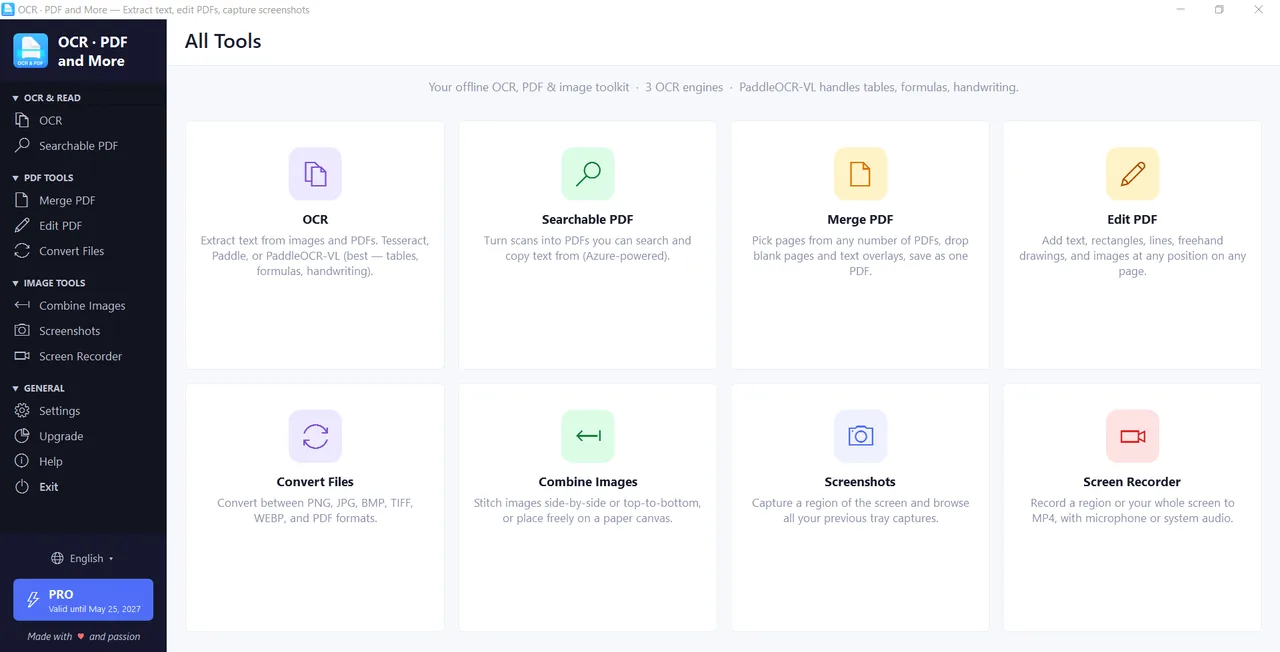
Retyping wastes hours. Uploading is worse.
Two problems with the way most people pull text off a scan, photo or PDF today.
Retyping eats your day
Copying text out of scans, photos and PDFs by hand is slow, mind-numbing — and every typo you introduce is one you have to hunt down later.
Your files end up on a stranger's server
Most online OCR and converters make you upload the document — your contracts, medical records and IDs sitting on someone else's cloud, out of your hands.
Limits, watermarks, paywalls
Page caps, throttling and "upgrade to remove watermark" right when you're mid-task — and you still don't own the tool.
Kaizen OCR keeps everything on your PC
Every engine and tool runs locally. Nothing is uploaded — not your scans, not your PDFs, not a single page.
4 engines — no document it can't read.
Most OCR tools give you one engine and hope for the best. Kaizen gives you four specialists — so whatever you throw at it, one of them nails it.
Tesseract
Extremely fast, CPU-only, and ships with 100+ bundled languages. Your everyday default for printed pages.
Paddle
Pulls rows and columns out cleanly. Strong on forms, invoices and tables — and fully offline.
Paddle-AI (VL)
An AI/ML vision model that runs fully offline. Best for noisy scans and handwriting. GPU-accelerated if you have one.
Azure
When all else fails — or to turn a scanned PDF into a searchable one. Bring your own key; up to 500 pages/month free.
One click for one page. One folder for thousands.
Drop in a photo, scan, screenshot or PDF — pick an engine, hit run, and get clean text with confidence scores and automatic table detection. Need volume? Add whole folders and batch-OCR thousands of pages in one go.
- Switch between all 4 engines per job
- Confidence scores & automatic table extraction
- 100+ languages and handwriting
- Copy to clipboard or export to text
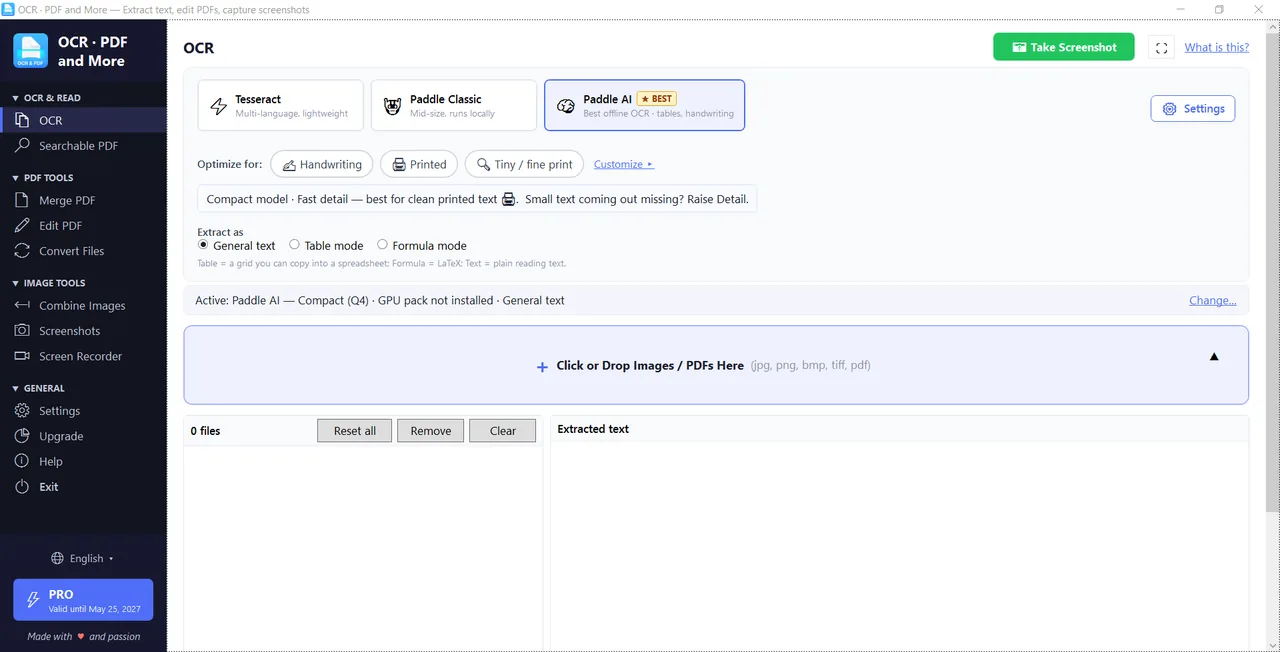
A full PDF & capture toolkit in one app.
Edit and merge PDFs, combine and convert files, batch thousands of pages, capture your screen and record HD video — all offline, all unlimited on Pro.
Edit PDF
Edit existing text, add text & images, annotate, rotate, reorder and delete pages — saved as a new file.
Merge & Create PDF
Combine multiple PDFs into one, pick pages from each, reorder, insert blanks and rotate before saving.
Combine Images
Stitch images horizontally, vertically or free-flow on a canvas — onto A4/Letter if you like. Output image or PDF.
Convert Files
PDF, DOCX, RTF, HTML, TXT, ODT, EPUB and images (PNG/JPG/TIFF/BMP/GIF) — convert almost anything, both ways.
PDF to Image
Pull every embedded image out of a PDF and export as PNG, JPG, BMP or TIFF — in batch.
Deskew & Edit
Auto-detect document edges, straighten skewed scans, then crop and annotate before saving or sharing.
Screenshots
Region, fullscreen, delayed and burst capture via global hotkeys — far beyond the Snipping Tool. Edit, then OCR.
Screen Recorder
Record HD MP4 screencasts up to 60 fps with mic or system audio, trim the clip, and share it. Share = Pro
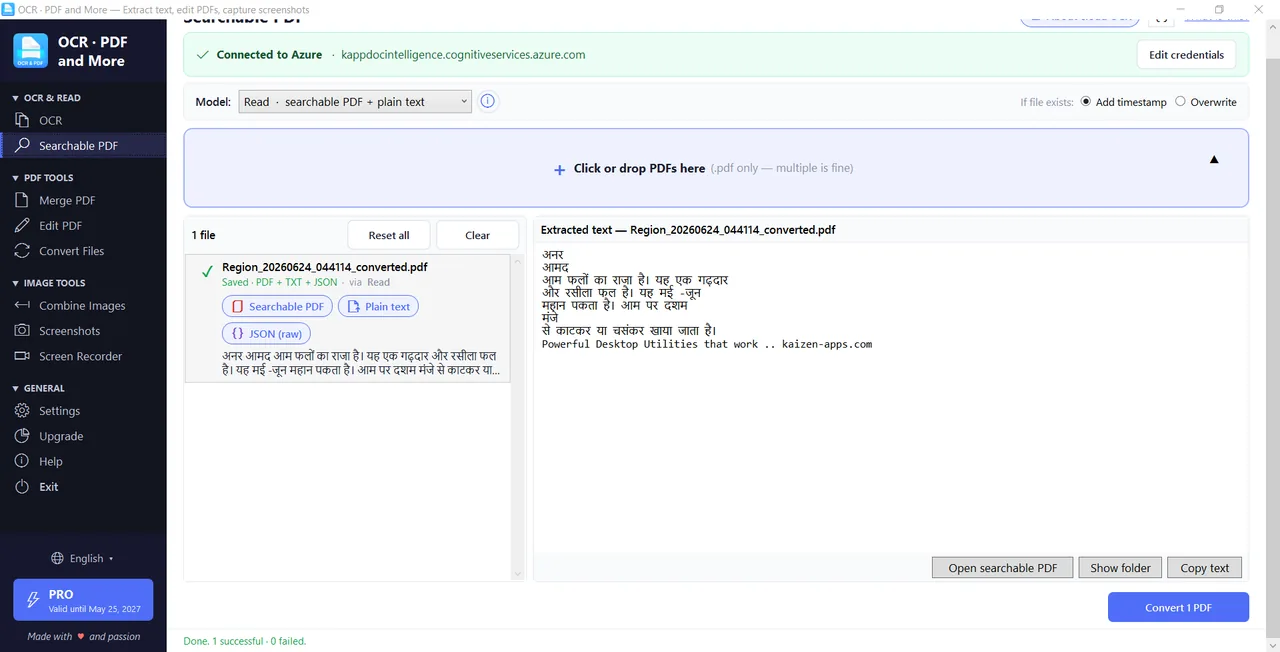
Turn flat scans into searchable PDFs.
Lay selectable text right over scanned pages so you can search, copy and select. Outputs searchable PDF, text, Markdown, HTML and JSON. This is the one optional online feature (your own Azure key) — everything else runs fully offline.
- Selectable text layered over scanned pages
- Export to PDF, text, Markdown, HTML & JSON
- Bring your own key — 500 pages/month free on Azure
- No key? The rest of the app still works offline
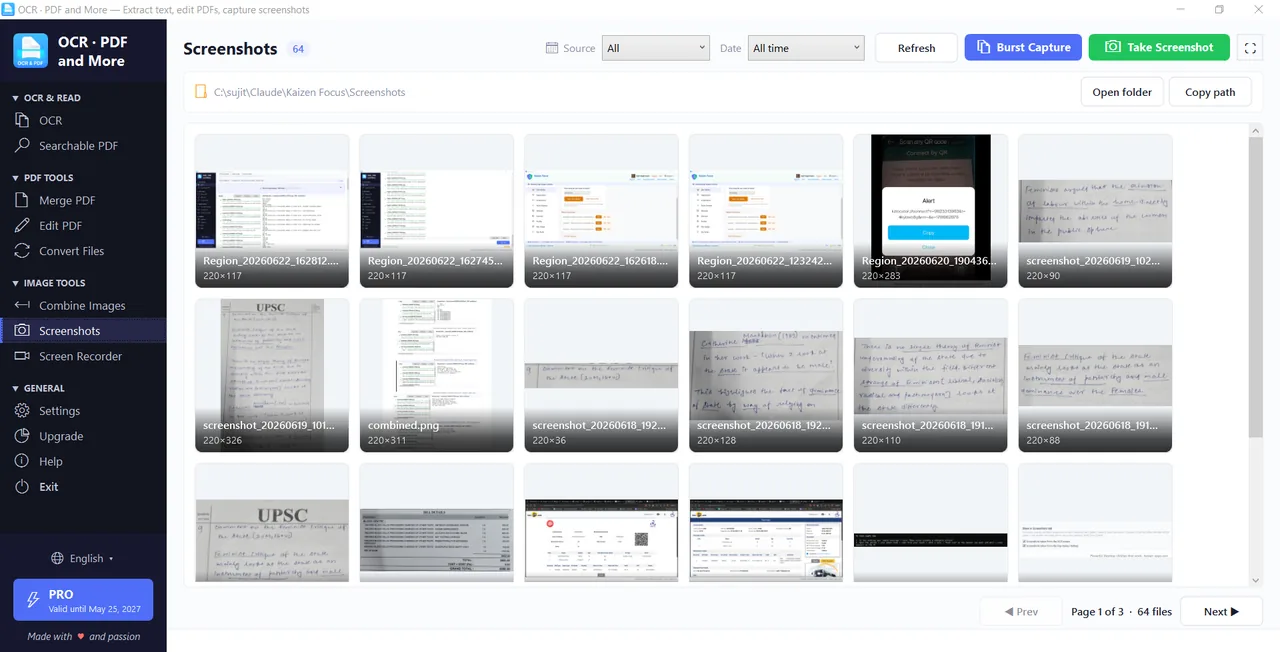
Screenshot, record, OCR — without switching apps.
A snipping tool, a screen recorder and an OCR reader in one. Capture a region with a hotkey and read the text on your screen instantly, or record a quick HD demo and trim it before you share.
- Global hotkeys for region, fullscreen & delayed capture
- Capture → OCR in a single keystroke
- HD recording, built-in trimming, mic/system audio
- One-click share links for images & videos Pro
Your confidential documents never leave your PC.
Doctors, lawyers and real-estate professionals handle documents that simply shouldn't be uploaded anywhere. Because Kaizen OCR runs entirely on your machine, you can process the most sensitive files with nothing leaving your computer — and it keeps working with no internet at all.
Works on a plane, in a clinic, or anywhere with no Wi-Fi.
Built for sensitive work
Medical, legal and real-estate documents stay with you — never uploaded.
No internet needed
Every engine and tool runs locally. No upload, no download, no waiting.
No limits or throttling
Batch thousands of files and folders at once — no page caps or paywalls.
No sign-up, no tracking
No account to create. Just install and start pulling out text.
One app that replaces a stack of them.
OCR, a PDF editor, a file converter, a snipping tool and a screen recorder — all in a single Windows app you own.
4 OCR engines
Tesseract, Paddle, Paddle-AI (offline) and Azure — a specialist for every kind of document.
100+ languages & handwriting
Printed pages, scanned PDFs and handwritten notes across more than a hundred languages.
Batch thousands of pages
Add whole folders and OCR — or convert — them all in one run. Built for high volume.
Full PDF toolkit
Edit, merge, combine images, convert files, PDF-to-image, and add/remove PDF passwords.
Screenshots & recorder
A built-in snipping tool and HD screen recorder with hotkeys, trimming and capture-then-OCR.
100% offline & private
Everything runs on your PC. Nothing is uploaded — ideal for confidential documents.
Try free. Own it for life.
Every feature is free to use up to 7 times — plenty to know it fits. Go Pro for unlimited use, or pay once for Lifetime and never renew.
Free
- 7 uses of every feature
- All 4 OCR engines
- All PDF & image tools
- Screenshots & screen recorder
- 100+ OCR languages
- Share links & unlimited use
Pro
- Everything in Free
- Unlimited use of every feature
- Batch OCR with no limits
- Azure Searchable PDF (BYOK)
- Share links + no watermark
- Priority email support
Lifetime
- Everything in Pro
- No renewals, ever
- Lifetime updates
- Use across your devices
- Priority support
No subscription — Pro is a one-year license, Lifetime is a single payment.
Built offline-first, privacy-first.
We build focused Windows and Android tools that just work — offline-first, privacy-first, and made to be owned, not rented. Kaizen OCR & PDF keeps your documents on your machine, because that's how we'd want our own contracts and records handled.
Get every document's text — in seconds, on your PC.
4 OCR engines, a full PDF toolkit, screenshots and screen recording — all offline, all private. Download free and get 7 uses of every feature.
Free: 7 uses of every feature · 100% offline · No subscription · Lifetime $49