
How it works
Focus enforces blocks at two levels:
- Hosts file — every browser on your machine fails to connect to blocked domains. This is the kill-at-the-root block.
- Process / window level — for specific paths (like YouTube channel pages) where a whole-domain block would be too broad, Focus watches browser windows via Windows UI Automation and closes or redirects them.
Three block types
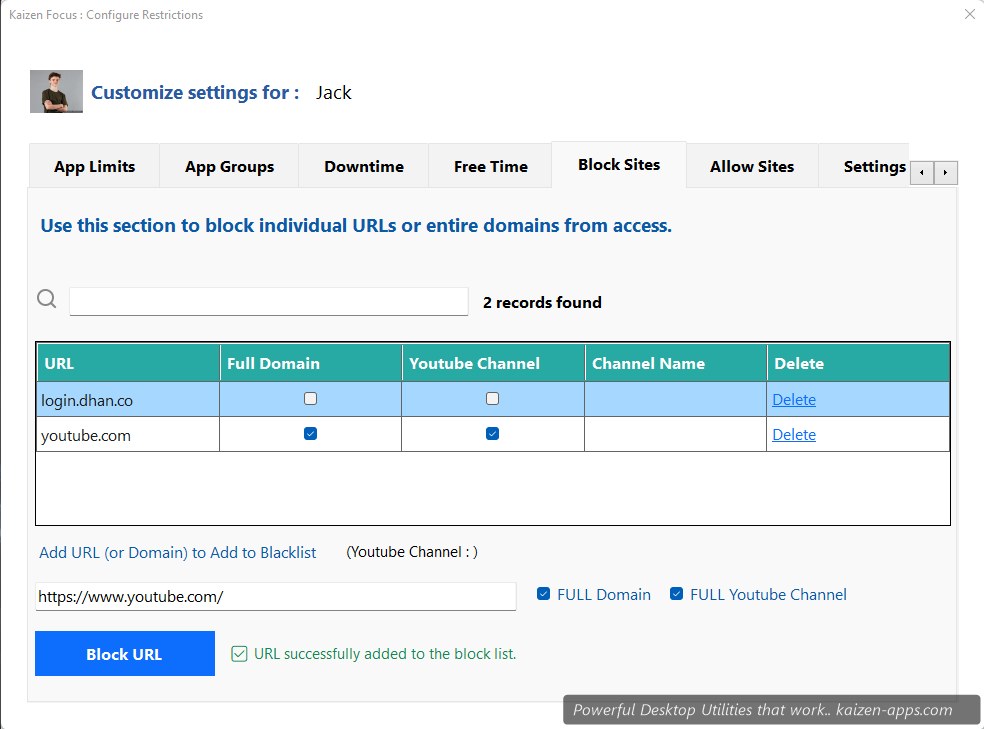
- Full URL —
https://reddit.com/r/programming. Just that one page. - Full domain —
reddit.com. Every subdomain and path. - YouTube channel — paste a channel URL (e.g.
https://youtube.com/@channelname). Just that channel gets blocked; the rest of YouTube works.
Adding a block
- Open My Rules → Block Sites.
- Enter the URL in the input at the top.
- Tick the appropriate checkbox: Full domain if you want to block the whole site, or Full YouTube channel for just that channel.
- Click Add. The block is active immediately.
Removing a block
Requires the admin PIN. Select the entry in the list and click Remove, enter PIN, confirm.
Supported browsers
Hosts-file blocking works in every browser on your system. Path-specific blocks (URL and YouTube channel) work in: Chrome, Firefox, Edge, Internet Explorer, Opera, Brave, Maxthon.
What happens when a user hits a block
Browser: they see the “site can't be reached” page (for domain blocks) or Focus's lock-screen overlay (for URL / YT channel blocks). Desktop apps: the window is closed or the app quits.
Tip. Start with 3–5 sites you actually lose time on — don't try to block the internet. A targeted blocklist is more effective than a giant one.
Kaizen Focus
Block distracting sites & apps, set daily limits and schedule downtime on Windows — for yourself, your family or your team.
Get Kaizen Focus →Free download