
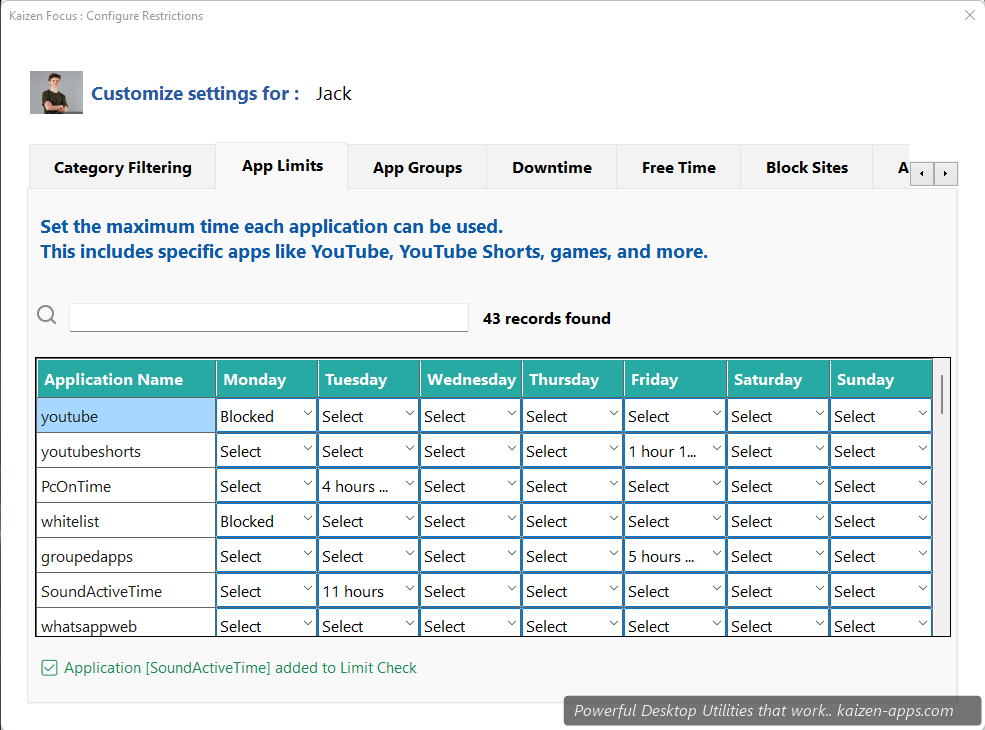
How limits work
Focus passively watches which apps and domains are active. Once an app's configured daily budget runs out, it's treated like a blocked site for the rest of the day. Budgets reset at midnight.
Configuring a limit
- Open My Rules → App Limits.
- Pick an app from the dropdown (YouTube, Instagram, Facebook, TikTok, etc.).
- For each day of the week, enter the minutes allowed. Use Blocked to block completely that day, or Select / blank for unlimited.
- Click Save, enter PIN.
Pre-recognised apps (43+)
Apps that have built-in detection (name matching, process identification):
- Social: YouTube, YouTube Shorts, Instagram, Facebook, TikTok, Twitter / X, LinkedIn, Reddit, Snapchat, Pinterest
- Messaging: WhatsApp Web, Telegram
- Streaming: Netflix, Twitch, Hotstar
- Games: Roblox
- Plus dozens more common apps and websites
Custom apps (advanced)
For apps not in the pre-recognised list, add them by process name (e.g. steam.exe, discord.exe). Focus matches by process name and window title.
App groups
Bundle multiple apps into a single shared limit:
- Social Media group: Instagram + Facebook + TikTok + Reddit, 45 min/day combined
- Entertainment: Netflix + Twitch + YouTube, 2 hours/day combined
App groups are configured under My Rules → App Groups.
Seeing remaining time
The dashboard shows a live counter per limit — you always know how much YouTube you have left today.
Tier differences
Free and Pro both support App Limits. Pro adds more granular per-day configuration and unlimited groups; Free has simpler shared limits.
Block distracting sites & apps, set daily limits and schedule downtime on Windows — for yourself, your family or your team.
Get Kaizen Focus →Free download