
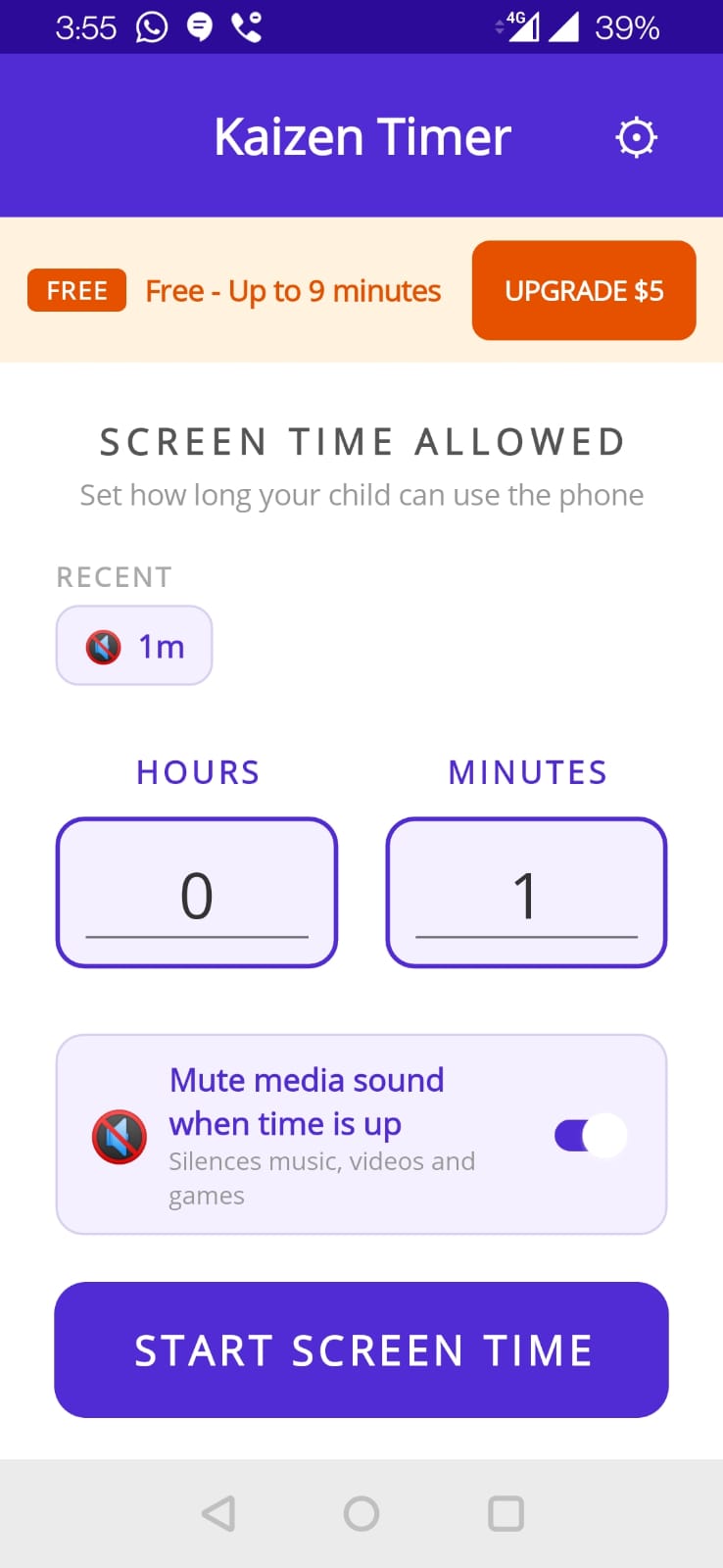
Five steps
- Open Kaizen Timer. The home screen appears.
- Pick your time. Use the Hours and Minutes wheels. Free tier max is 9 minutes; Pro goes up to 23 hours.
- Optional: toggle Mute media on timeout. If on, when time expires, any playing audio (YouTube, games) is silenced. Recommended.
- Tap START SCREEN TIME. The timer screen opens.
- Hand the phone over. The timer keeps running even if your child switches apps, locks the screen, or tries to force-close Kaizen Timer.
While the timer runs
Your child sees whatever app they're using. A small notification in the status bar shows remaining time. At 10 minutes and 3 minutes remaining, Kaizen Timer plays a soft alert sound (alert_chord.mp3) to let them know time's running out.
When time expires
The lock-screen overlay appears: “TIME IS UP!” The phone can't escape it. There are two options:
- Parent enters PIN — unlocks the phone.
- SOS Extend — the child can tap this once per session for +2 minutes.
Change the default PIN now
Default PIN is 1234. Change it immediately — otherwise the feature is useless. Tap the settings icon on the home screen, then Change PIN. Enter a new 4–6 digit PIN you'll remember but your kid won't guess.