
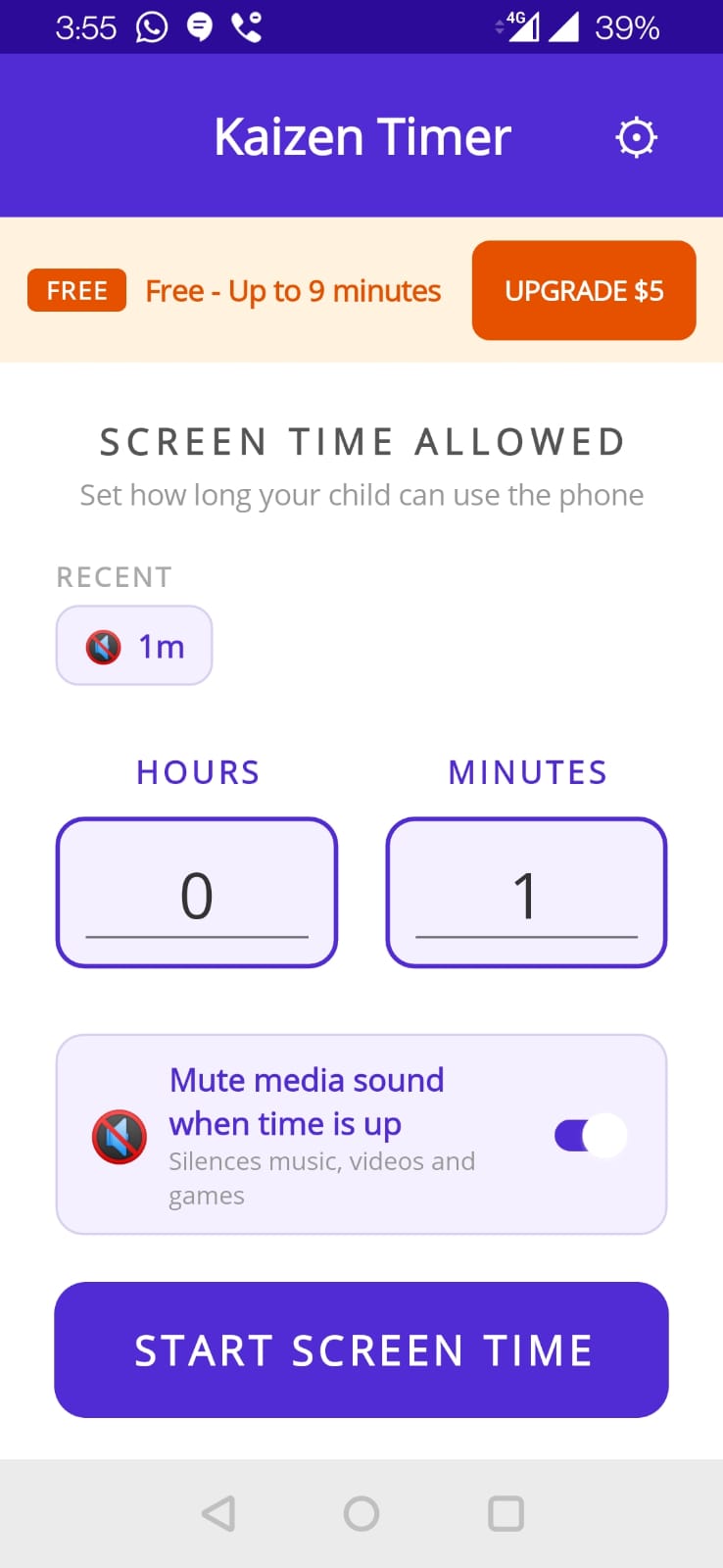
The wheel pickers
Two wheels: Hours (0–23) and Minutes (0–59). Drag each to pick. Minimum is 1 minute (you can't start at 0:00).
Free tier cap
Free tier is limited to 9 minutes per session. Try to pick more than that and the app shows an upgrade prompt. Pro removes this cap.
Presets
Your last 3 timer setups are saved and shown as tap-to-apply presets above the pickers. Each preset remembers:
- Hours + Minutes
- Mute-media toggle state
Tap a preset to apply those values to the pickers. Tap Start to run.
Mute media on timeout
A toggle below the pickers. When ON, Kaizen Timer silences media audio (music, videos, games) when time expires. Alarms and ringtones stay audible — they use different Android audio streams.
When to turn it ON
- Kid is watching YouTube or playing media-heavy games
- You want a decisive “audio stops” moment to signal end-of-time
When to turn it OFF
- Kid is listening to an audiobook you want to continue past the lock
- You're using Kaizen Timer for your own focus session and want to hear other sounds
The Start button
Hits START SCREEN TIME. The timer screen opens and the countdown begins immediately.
Tips
- For recurring sessions, presets make the second setup one tap.
- Set slightly longer than you think — the SOS extend (+2 min) is a one-time safety valve but don't rely on it.
- For very young kids, pair with a physical visual timer (or let them see the phone's notification countdown) so they can see time elapsing.