
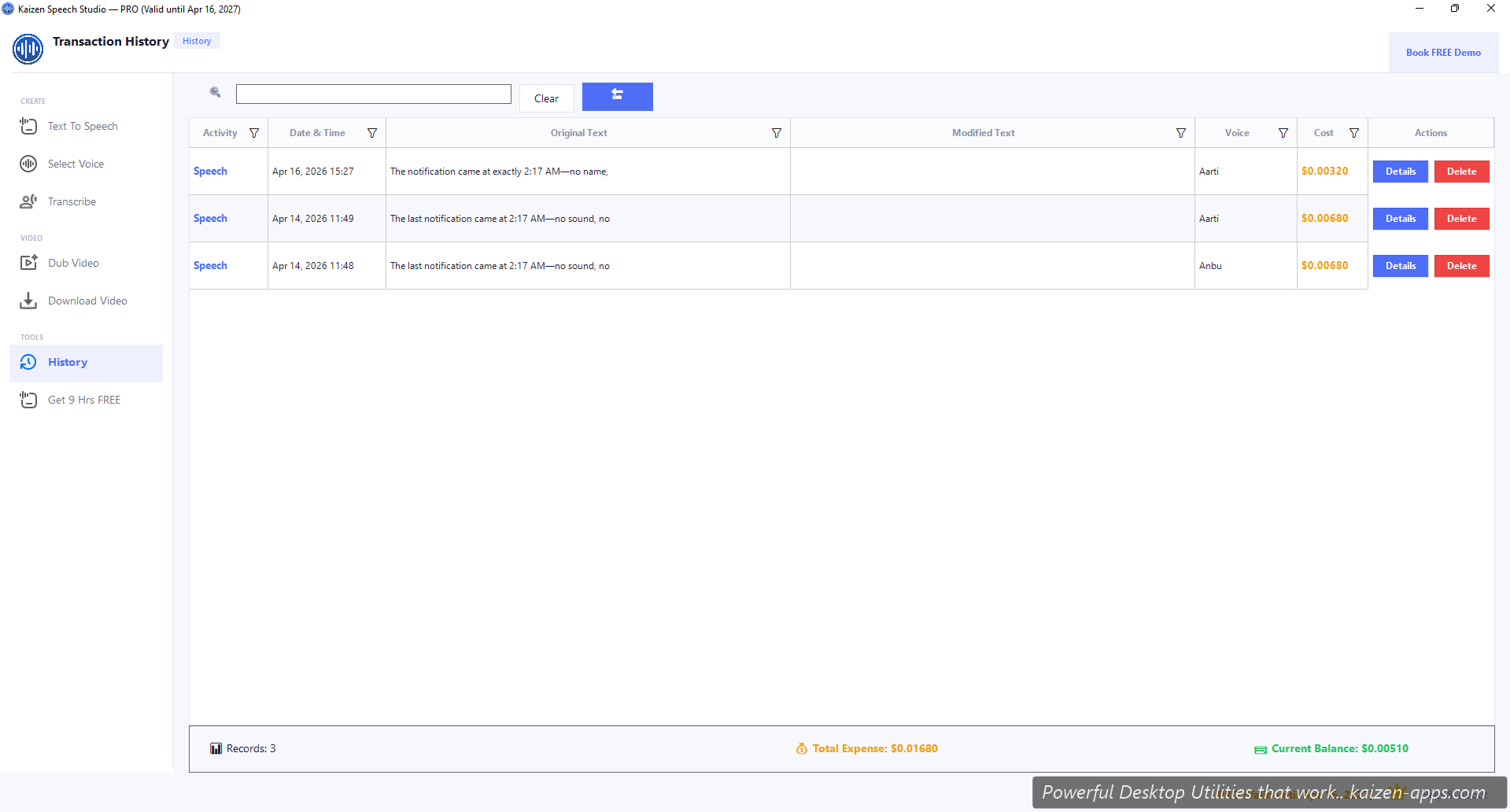
What gets logged
- Activity type — Speech, Script, Improve, Translate (dub)
- Preview text — first 50 chars of original + translated (if applicable)
- Cost — estimated USD charge (based on Azure pricing)
- Voice — which voice was used
- Language — source language
- Timestamp — when you ran it
Sorting & filtering
Click any column header to sort. Search bar filters by text snippet or voice name. Pick a date range for monthly reviews.
Actions per row
- View details — open the full transaction including complete text
- Copy to clipboard — grab the generated text or audio path
- Re-run — send the same text/voice back to the editor for regeneration
- Delete — remove from local history (doesn't un-bill you at Azure)
Cost accuracy
Costs are Speech Studio's estimates based on Azure's published pricing. Actual Azure billing is the source of truth — check Cost Management in Azure Portal for the real numbers.
Data location
History is a local SQLite database in your Speech Studio user folder. Never synced, never uploaded. If you reinstall, you can preserve it by backing up the database file.
Kaizen Speech Studio
700+ neural AI voices, transcription and AI video dubbing on Windows — one-time purchase, works offline.
Get Kaizen Speech Studio →Free download