- Kaizen Apps
- Speech Studio
 Kaizen Speech StudioWindows 10 and 11, 64-bit
Text to speech software for Windows, with 603 neural voices
Type or paste a script, pick a voice, and get a narration file for your video, course or podcast. Speech Studio connects to your own Microsoft Azure Speech key, so usage is billed by Microsoft and not by us.
- Generating speech needs a license and your own Azure key
- One-year license does not renew automatically
- 3-day refund on paid licenses
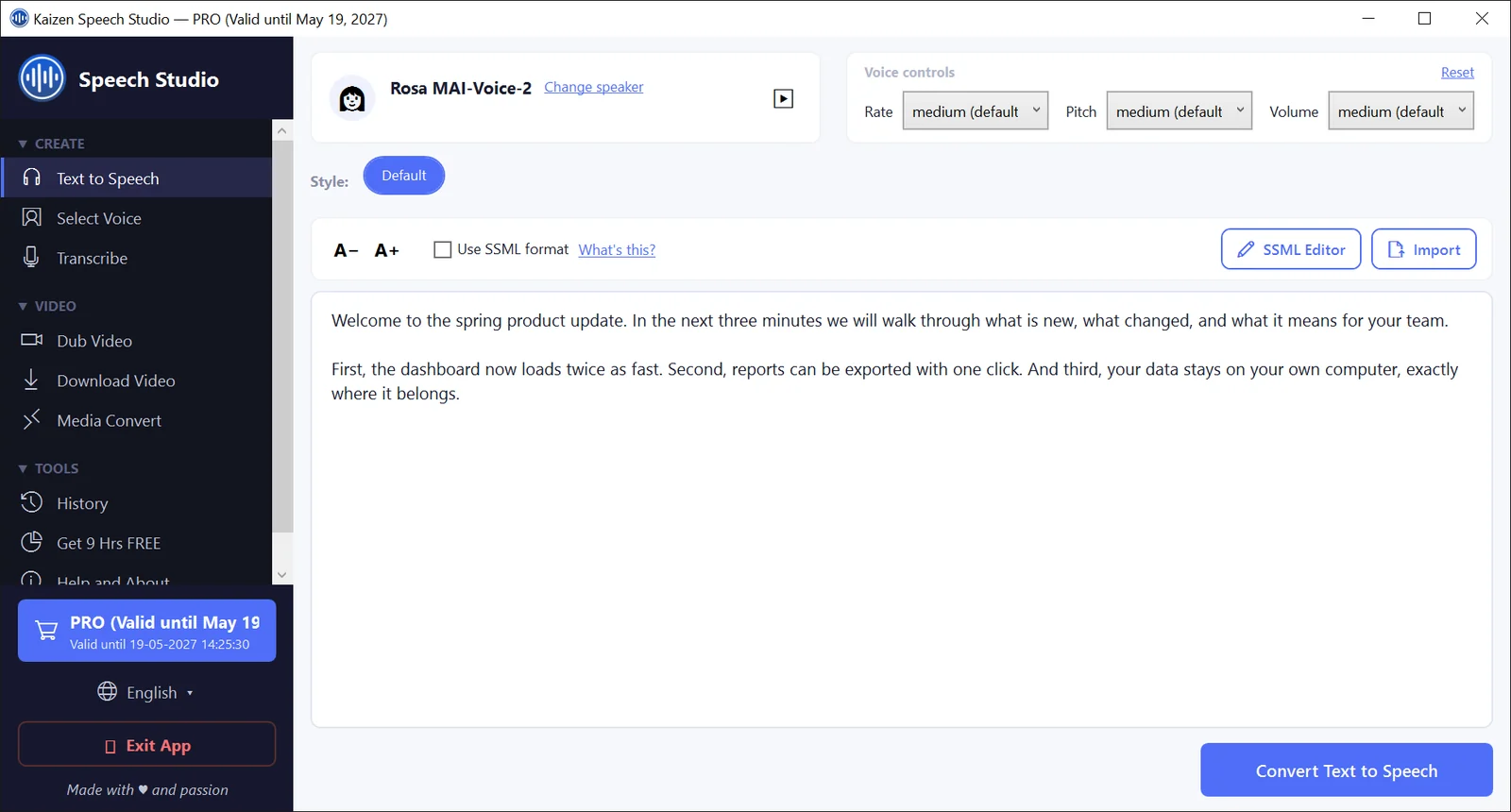
Find the right AI voice in seconds
603 Microsoft Azure neural voices ship with the app, covering 80+ languages and 140+ regional variants. Search by name, language or style, listen to a sample, then select the voice for your script.
- Quick filters: Female, Male, Neural, Podcast, Favorites, Recent
- More filters for age group, style, personality and scenario
- A details window with playable samples for most voices
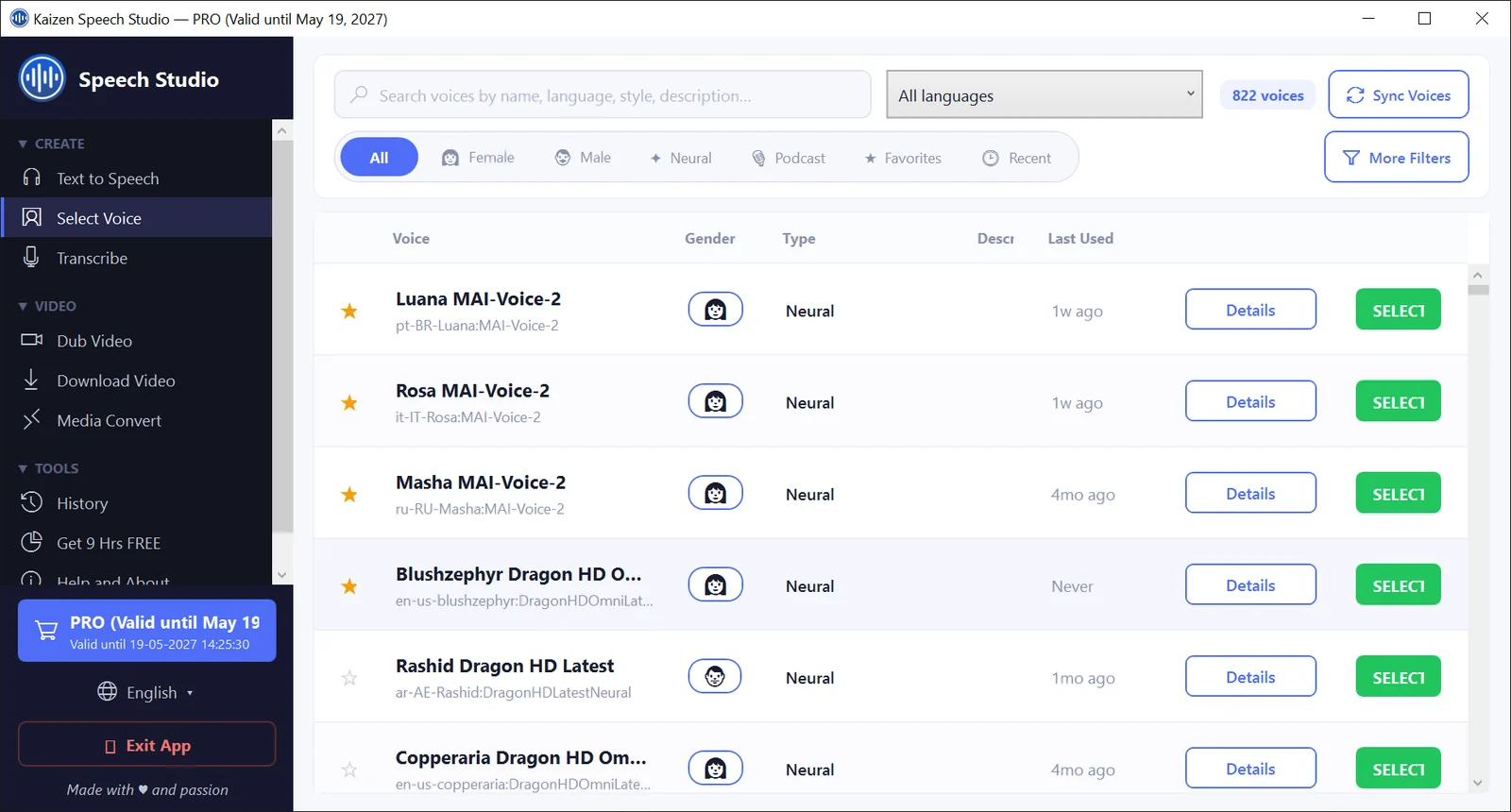
Transcribe audio to text from a microphone or a file
Speak into a microphone and watch the text appear, or choose a recording and let Azure transcribe it. Pick up to 10 languages from 141 locales and Azure switches between them as the speaker does.
- File types: WAV, MP3, MP4, M4A, AAC, WMA and FLAC
- Pause, resume and stop a live session
- Keep the microphone recording as WAV or MP3, five quality presets
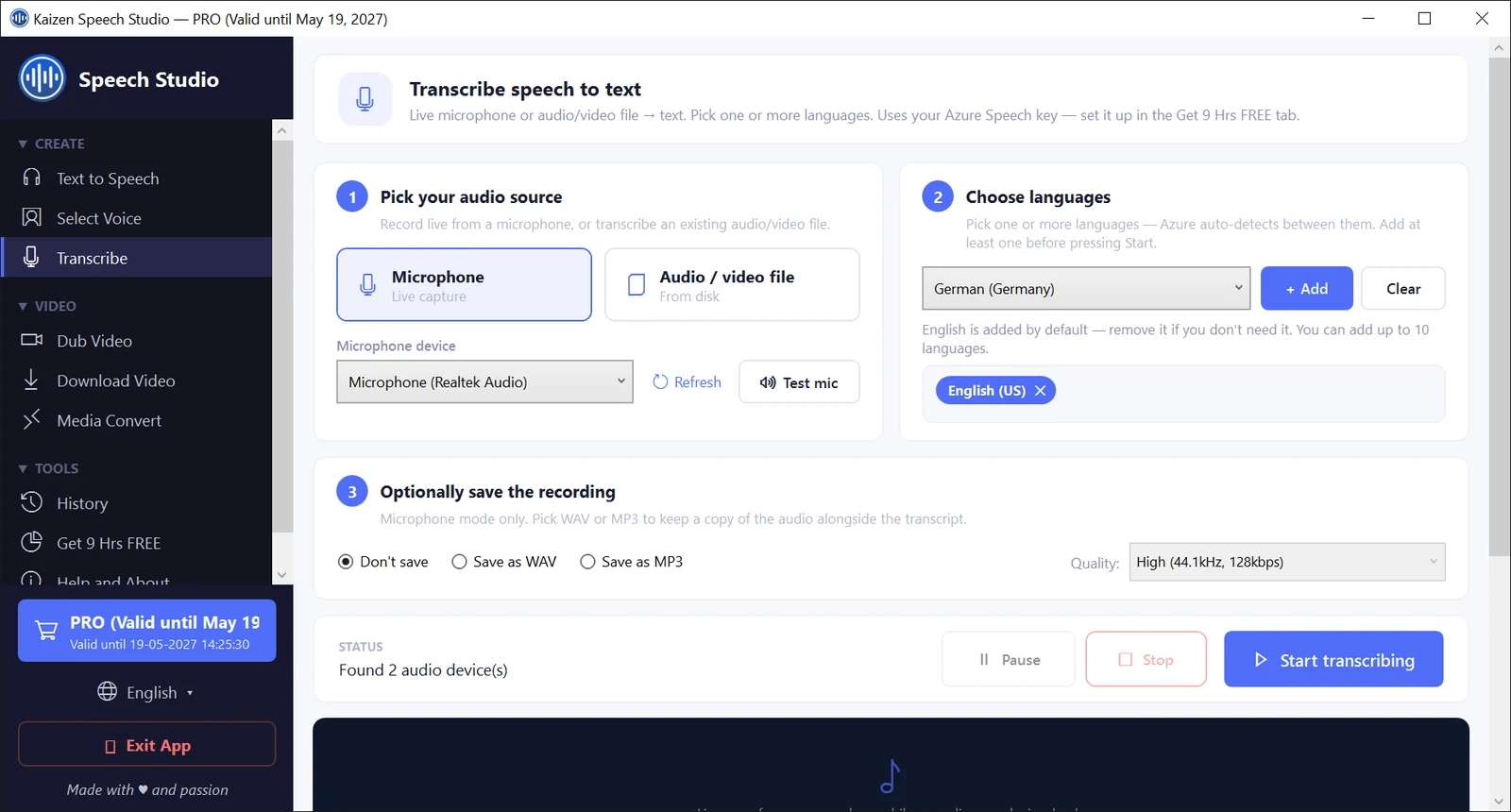
Dub a video into another language
Select a video, choose the language it is in and the language you want, and click Translate Video. Azure's Video Translation service produces a new MP4 with a translated voice track, saved next to your original.
- 136 locales for source and target language
- Optional subtitles burned into the translated video
- Each stage shown as it runs, with a Cancel button
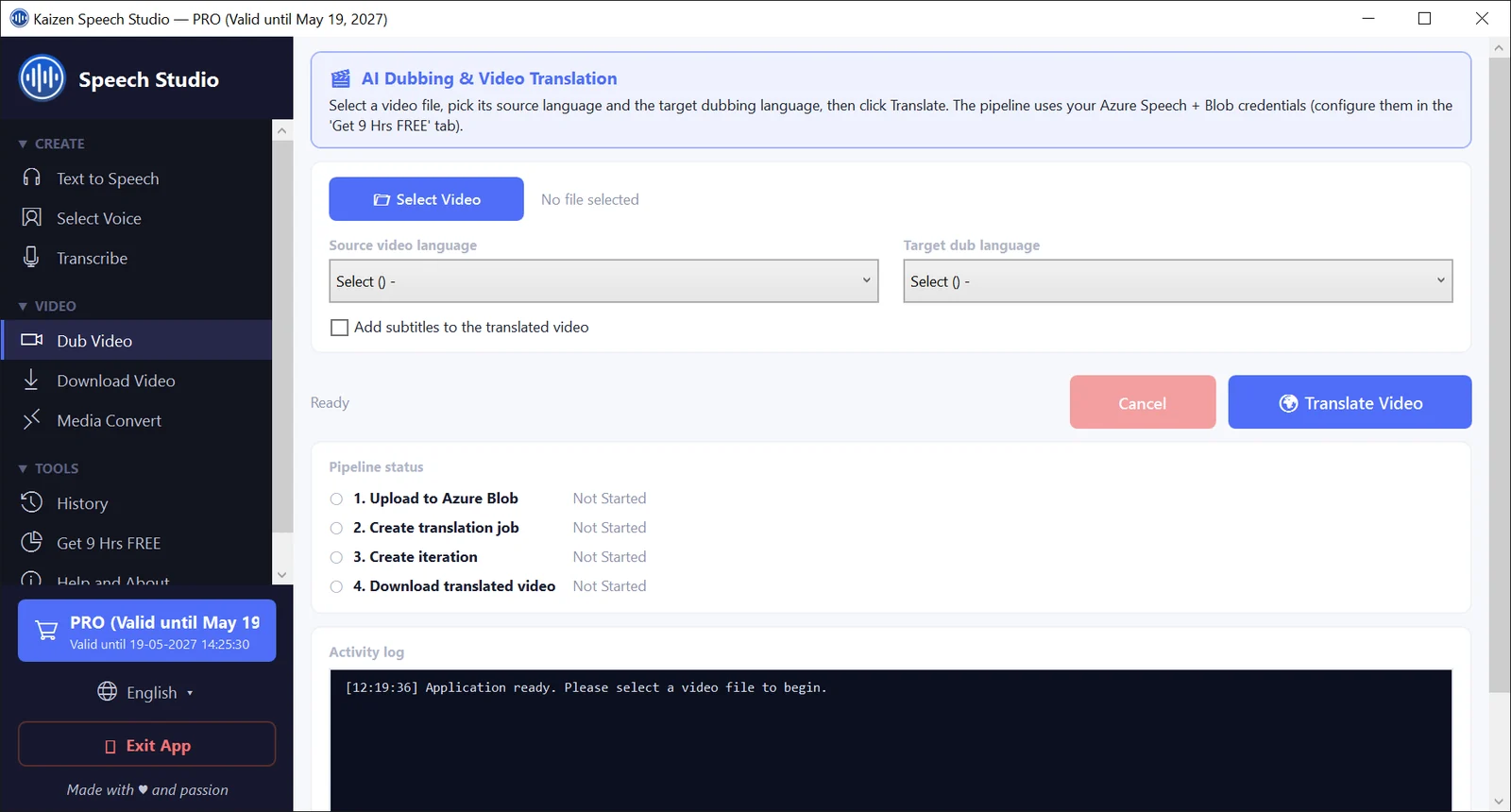
Control how your AI voiceover sounds
Convert audio and video files to MP3, WAV or MP4
Drop in a file and convert it without leaving the app.
Rate, pitch and volume
Five named steps for each, from x-slow to x-fast and silent to x-loud. One click resets them.
Speaking styles
Voices that support styles show them as chips, such as cheerful, sad or newscast. 58 of the 603 included voices have styles.
Multi-speaker scripts
The SSML Editor builds a script from segments. Each segment has its own voice, style and text, and you can reorder or duplicate them.
Pauses and pronunciation
Insert pauses from 250 ms to any length, add emphasis, and tell the voice how to read numbers, dates and phone numbers.
Import a document
Load the text of a TXT, PDF, DOC or DOCX file straight into the editor.
One license, two ways to pay
Both licenses include every feature. Azure usage is separate and billed by Microsoft to your own account.
Does not renew automatically.
- Text to speech with your own Azure key
- 603 voices, plus voice sync with Azure
- SSML Editor with unlimited segments
- Import TXT, PDF, DOC and DOCX
Pay once, no end date.
- Everything in the one-year license
- No expiry date on the license
- Costs about the same as two years of Pro
Licenses are sold through Paddle, our reseller, and the key arrives by email. Refunds are available for 3 days after purchase: write to [email protected]. Prices do not include Microsoft Azure usage.
Questions about Kaizen Speech Studio
Is Kaizen Speech Studio free text to speech software?
No. The download is free and you can open the app, browse the 603 voices and play their samples without paying. Generating speech needs a paid license and your own Microsoft Azure Speech key.
Why do I need an Azure account for Azure text to speech?
The voices are Microsoft Azure neural voices, and the app calls Azure with your own Speech key. You create a Speech resource in the East US region of your Azure account and paste the key into the app. A key from another region will not work.
How much does it cost in total?
The license is $49 for one year or $99 for lifetime. The one-year license does not renew automatically, and there is a 3-day refund. On top of that, Microsoft bills your Azure account for the speech you generate, at its own rates.
Is there a free tier on Azure?
Microsoft offers a free tier (F0) for the Speech service. The app's setup screen quotes Microsoft's allowance as 500,000 characters, about 9 hours of speech, each month. Those are Microsoft's terms and can change, so check Azure's pricing page. On the paid tier (S0) Microsoft bills every character.
Which audio format does the AI voice generator save?
Speech is saved as a WAV file. To get an MP3, open the item in History and export it, which creates a 128 kbps MP3.
Can it transcribe audio to text?
Yes, with a license and your Azure key. It transcribes live from a microphone or from WAV, MP3, MP4, M4A, AAC, WMA and FLAC files. The result is plain text you copy to the clipboard. It has no timestamps, speaker labels or subtitle file export.
Good to know: You need a license and an Azure account
Speech generation, transcription and dubbing work only with a paid license and your own Azure Speech key. Without a license you can look around the app, browse the voices and play their samples, but you cannot generate speech.
Good to know: Azure usage is billed by Microsoft
Your text goes from your PC straight to your Azure resource. Microsoft charges for it, or covers it under its free tier, on its own terms. The key must come from the East US region. Dubbing also needs an Azure Blob Storage account.
Good to know: It needs an internet connection
All speech work runs in Azure's cloud. The app also checks its license online at start and every few hours, and stops working if it has not reached the license server for 24 hours.
Good to know: What it does not do
No voice cloning or custom voices. Dubbing has no lip sync and you pick the source language yourself. Speech is saved as WAV, and MP3 is an extra export step from History.
Turn your next script into a voiceover
Download Speech Studio for Windows, add a license and your Azure Speech key, and convert your first script today.