
Monitor & Boost Team Productivity
Track employee activity, capture screenshots, and generate automated reports. Understand how your team spends their time and identify opportunities to improve productivity.
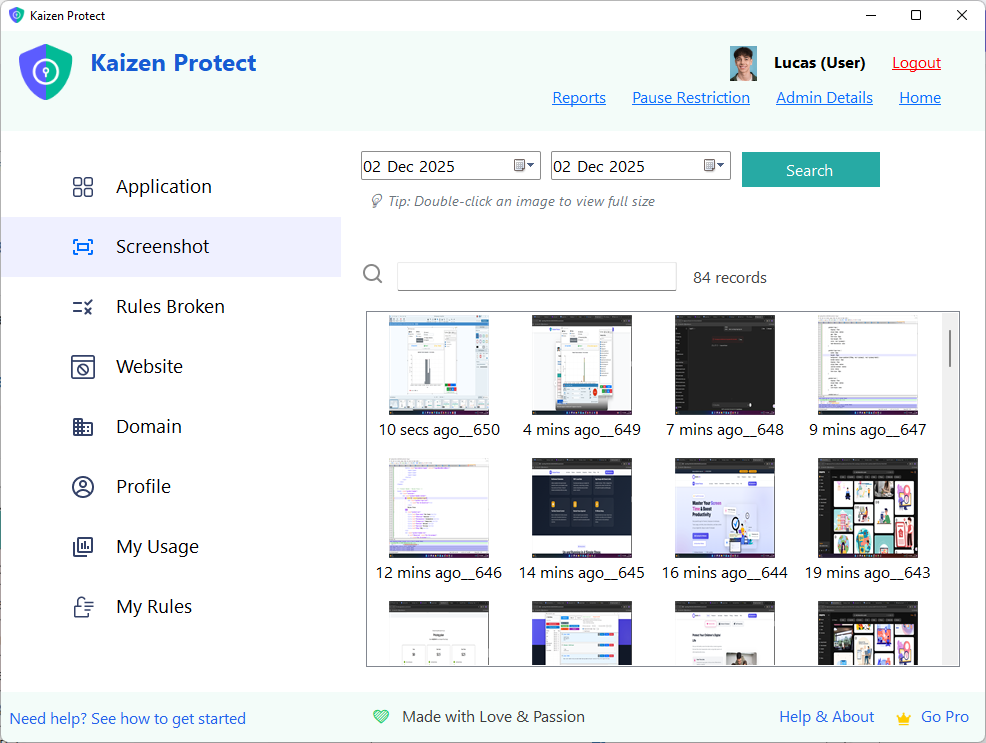
Powerful Employee Monitoring Tools
Kaizen Focus Work Mode gives managers and business owners the insights they need to optimize team performance.
Real-Time Activity Tracking
See exactly which applications and websites employees are using throughout the day. Get a clear picture of how work hours are spent.
Random Screenshot Capture
Automatically capture screenshots at random intervals to verify work activity. Screenshots are stored locally for your review.
Location Tracking (100m Accuracy)
Track where company laptops are being used. Verify that remote employees are working from approved locations with GPS-level accuracy.
Automated Email Reports
Receive daily or weekly email summaries of employee activity, top apps used, productive vs. unproductive time, and more.
App & Website Usage Analytics
Detailed breakdown of time spent on each application and website. Categorize apps as productive, neutral, or unproductive for your team.
Idle Time Detection
Automatically detect when employees are idle or away from their computers. Distinguish between active work time and breaks.
Multi-User Profiles per Device
Set up separate monitoring profiles for different employees sharing the same workstation. Track each user's activity independently.
Tamper-Resistant Settings
All monitoring settings are password-protected. Employees cannot disable, modify, or uninstall the software without admin credentials.
Get Started in Minutes
Setting up employee monitoring with Kaizen Focus is straightforward and takes less than 5 minutes per device.
Install on Employee PCs
Download and install Kaizen Focus on each workstation you want to monitor. Setup takes under 2 minutes.
Configure Work Mode
Set your admin password, enable screenshot capture, configure email reports, and customize tracking preferences.
Review Reports
Receive automated email reports and review screenshots, usage data, and productivity metrics from your inbox.
Affordable Employee Monitoring
One license per device. Volume discounts available for teams of 10+. Contact us for enterprise pricing.
Free Trial
- Basic activity tracking
- App usage monitoring
- Daily summaries
- Screenshot capture
- Email reports
- Location tracking
Yearly
- Real-time activity tracking
- Random screenshot capture
- Location tracking
- Automated email reports
- App & web analytics
- Idle time detection
- Multi-user profiles
- Tamper-resistant settings
Lifetime
- Everything in Yearly
- Lifetime updates
- Priority support
- No recurring fees
Frequently Asked Questions
Common questions about employee monitoring with Kaizen Focus.
Start Monitoring Your Team
Boost productivity and gain visibility into how your team works. Set up in minutes with a free trial.